About Me

My photo
PLANO, Texas, United States
Showing posts with label #Canvas Integration. Show all posts

Friday, December 31, 2021

Canvas

  • Canvas enables you to easily integrate a third-party application in Salesforce. Canvas is a set of tools and JavaScript APIs that you can use to expose an application as a canvas app. This means you can take your new or existing applications and make them available to your users as part of their Salesforce experience.

  • The third-party app that you want to expose as a canvas app can be written in any language. The only requirement is that the app has a secure URL (HTTPS).


Note-Before diving into canvas, consider these other options for integrating a third-party application in salesforce:

Web tabs- Canvas apps present third-party applications as part of a page. Web tabs can present a full application in large screen space.

HTML iframes in a custom component-Canvas apps provide greater functionality than developing with iframes. Iframes are sometimes easier to integrate with your application

Where Canvas Apps Appear?

Canvas apps can appear in a few places.

  • Chatter Feed—The canvas app appears in the feed. If this option is selected, you must create a CanvasPost feed item and ensure that the current user has access to the canvas app.

  • Chatter Tab—The canvas app appears in the app navigation list on the Chatter tab. If this option is selected, the canvas app appears there automatically.

  • Console—The canvas app appears in the footer or sidebars of a Salesforce console. If this option is selected, you must choose where the canvas app appears in a console by adding it as a custom console component.

  • Layouts and Mobile Cards—The canvas app can appear on a page layout or a mobile card. If this option is selected, you choose where the canvas app appears by adding it to the page layout.

  • Mobile Nav—The canvas app is accessible from the mobile app navigation menu.

  • Open CTI—The canvas app appears in the call control tool. If this option is selected, you must specify the canvas app in your call center’s definition file for it to appear

  • Publisher—The canvas app appears in the Chatter publisher and action bar. If this option is selected, you must also create a canvas custom action and add it to the global publisher layout or to an object’s page layout.

  • Visualforce Page—The canvas app can appear on a Visualforce page . If you add an <apex:canvasApp> component to expose a canvas app on a Visualforce page, be sure to select this location for the canvas app; otherwise,you’ll receive an error.

Note- You can see what are the available options for canvas from the connected app under Canvas app setting.

Authentication-

When you create a canvas app, you can use one of the following authentication methods:

  • Signed request—The default method of authentication for canvas apps. The signed request authorization flow varies depending on whether the administrator gives users access to the canvas app or if users can self-authorize. The signed request containing the consumer key, access token, and other contextual information is provided to the canvas app in one of these ways:

    • The administrator allows access to the canvas app for the user.

    • The user approves the canvas app in the OAuth flow.

  • OAuth 2.0—Canvas apps can use the OAuth 2.0 protocol to authorize and acquire access tokens.When using OAuth with Canvas, you have two options:

    • Web server flow—To integrate a canvas app with the Salesforce API, use the OAuth 2.0 web server flow, which implements the OAuth 2.0 authorization code grant type. With this flow, the server hosting the web app must be able to protect the connected app’s identity, defined by the client ID and client secret.

    • User-agent flow—With the OAuth 2.0 user-agent flow, users authorize a canvas app to access data using an external or embedded browser. This flow uses the OAuth 2.0 implicit grant type. 

Demo of Canvas Application

Let’s start with a very basic demo of Canvas. Let’s say we have two Salesforce orgs, Salesforce Service Provider and Salesforce Identity provider. The Canvas app is hosted in Idp salesforce org and uses signed requests to reference a VF page in the second org. 


Step1: Go to Idp org and enable Identity Provider as below:


Step2: Go to Sp org and enable Single Sign-On as below:


Note- You can download a metadata file from Identity Provider Setup of Idp org and upload into SSO settings in SP org. 

Step3: Create Connected App in IDP org as below: 


Step4: Manage Policy by clicking the manage button on the connected App. You can decide how you want to give the access etc.

Step 5: Create the VF page in idp org and using below tag:

<apex:page>

 <apex:canvasApp developerName="CanvasDemoApp" />

</apex:page>


Saturday, September 19, 2020

Streaming API

What is the force.com streaming API?

  • Stream API exposes a near real-time stream of data from the force.com platform.
  • Using the API, notifications can be sent to Pages in salesforce application, Application servers outside salesforce or to external client.
  • Streaming API use for Applications that need to poll against Salesforce data frequently near real-time
  • Streaming API enables you to reduce the number of API calls and improve performance. For example- Applications like (Mulesoft) that have constant polling action against the Salesforce, consuming unnecessary API calls and processing time would benefit from Streaming API because it reduces the number of requests that return no data.

What is the basic technology behind the streaming API?

  • It uses Push Technology or Publish/Subscribe Model

What are the underlying mechanisms for the streaming API

To enable the publish/subscribe model, an active connection must be maintained between Salesforce and each client to enable the publish/subscribe model. Steaming API relies on the method Long Polling. Streaming API uses the Bayeux protocol and CometD for long polling.


Below are the three steps to connect the client:

  • CometD sends a handshake request.
  • The client subscribe to the channel
  • CometD maintains the connection by using long polling.
You can visualize the concept. Let's go to the workbench, when you go to Streaming push topic from the queries tab in workbench. 1st you see the Handshake success message and then you need to select a topic push topic to subscribe and if you will make any change in CRM associate your push topic, you will see notifications in workbench.


What is PushTopic?

PushTopic is a record that

  • Defines a channel
  • Determine what event will cause the notification
  • Describes the data the notification will contain.
An event is a modification of a field while creating, updating, deleting or undeleting the record whenever an event occurs it sent the notification. However, updates performed by the BULK API won’t generate the notifications, since such updates could flood a channel.

When multiple PushTopic notifications are generated for the same record within about one millisecond and in the same transaction, only the last notification is sent. 

A notification is data sent as a result of an event to the clients who subscribe to the associate channel. 


What is the channel name?

  • Subscribers identify a channel using the name of assigned to the PushTopic.
  • In the above example pushTopic.Name='pushTopicForAccount';. The channel name will be '/topic/pushTopicForAccount'
  • The Channel name must match the PushTopic name exactly, including the casing of the letters.
  • If a Push Topic name is changed, live subscribers are not affected however, new subscribes must use the latest Push topic name. 

When will an event generate the notification?

Notifications are generated for record events based on how you configure your PushTopic. 

  • The Streaming API matching logic uses the NotifyForOperationCreate, NotifyForOperationUpdate, NotifyForOperationDelete, NotifyForOperationUndelete, and NotifyForFields fields in a PushTopic record to determine whether to generate a notification.
  • Clients must connect using the cometd/29.0 (or later) Streaming API endpoint to receive delete and undelete event notifications.

How to define what data to include in notification?
Data in the notification is determined by:
  • The select clause of the PushTopic
  • The Access the user has to data


How does security work with PushTopics?
To receive a record notification, the logged-in user must have:
  • API Enabled permission.
  • Streaming API permission.
  • Read access to the object specified in the query.
  • Field-level security access for the fields in query
  • Access to record by sharing rules
  • Data returned by the query will be limited to the fields that the user has permission to access 

What are the unsupported queries in PushTopics?

The following SOQL statements are not supported in PushTopic queries:

  • Queries without an Id in the selected fields list
  • Semi-joins and anti-joins
    • Example query: SELECT Id, Name FROM Account WHERE Id IN (SELECT AccountId FROM Contact WHERE Title = 'CEO')
    • Error message: INVALID_FIELD, semi/anti join sub-selects are not supported
  • Aggregate queries (queries that use AVG, MAX, MIN, and SUM
    • Example query: SELECT Id, AVG(AnnualRevenue) FROM Account
    • Error message: INVALID_FIELD, Aggregate queries are not supported
  •  COUNT
    • Example query: SELECT Id, Industry, Count(Name) FROM Account
    • Error message: INVALID_FIELD, Aggregate queries are not supported
  • LIMIT
    • Example query: SELECT Id, Name FROM Contact LIMIT 1
    • Error message: INVALID_FIELD, 'LIMIT' is not allowed
  • Relationships aren’t supported, but you can reference an ID:
    • Example query: SELECT Id, Contact.Account.Name FROM Contact
    • Error message: INVALID_FIELD, relationships are not supported
  • Searching for values in Text Area fields
  • ORDER BY
    • Example query: SELECT Id, Name FROM Account ORDER BY Name
    • Error message: INVALID_FIELD, 'ORDER BY' clause is not allowed
  • GROUP BY
    • Example query: SELECT Id, AccountId FROM Contact GROUP BY AccountId
    • Error message: INVALID_FIELD, 'Aggregate queries are not supported'
  • Formula fields in WHERE clauses (formula fields are supported in SELECT clauses though.)
  • NOT
    • Example query: SELECT Id FROM Account WHERE NOT Name = 'Salesforce.com
    • Error message: INVALID_FIELD, 'NOT' is not supported
    • To make this a valid query, change it to SELECT Id FROM Account WHERE Name != 'Salesforce.com'
What is returned in streaming API Notifications?

The response containing the notification is encoded in JSON.


How can you deactivate a PUSHTOPIC?

To deactivate a PushTopic:

  • Determine the ID of the PushTopic
  • Create Apex Code to deactivate the PushTopic as below:


Where can PUSHTOPIC code be executed?

PushTopic can be executed in two ways:
  1. Execute code using the Anonymous Window of the developer console
  2. Load the PushTopic data using Data loader
You can also create apex class passing all required parameters for pushtopic and be reused in different places within the org.

How do we handle error in Streaming API? 
There are different types of error in streaming API integration:
401 Authentication Errors-Client authentication can sometimes become invalid, for example, when the OAuth token is revoked or a Salesforce admin revokes the Salesforce session. An admin can revoke an OAuth token or delete a Salesforce session to prevent a client from receiving events. Sometimes a client can inadvertently invalidate its authentication by logging out from a Salesforce session. Streaming API regularly validates the OAuth token or session ID while the client is connected. If client authentication is not valid, the client is notified with an error. A Bayeux message is sent on the /meta/connect channel with an error value of 401:: Authentication invalid and an advice field containing reconnect=none. After receiving the error notification in the channel listener, the client must reauthenticate and reconnect to receive new events.
  1. 403 Unknown Client Error-If a long-lived connection is lost due to unexpected network disruption, the CometD server times out the client and deletes the client state. The CometD client attempts to reconnect but the connection is rejected with the 403:: Unknown client error because the client state doesn't exist anymore. The error response returned when the client attempts to reconnect after a timeout looks similar to the following message

  2. 503 Server Too Busy Error-If the Salesforce servers don’t have available resources to process your Streaming API request, a 503 error is returned in the ext/sfdc/failureReason field. This error is returned for a handshake or a connection request. For example, this response shows the 503 error on the /meta/connect channel.

To know more about the security aspect of integration, pls Click here
To know more other integration API at a glance, pls Click here

Canvas Integration

Why Force.com Canvas integration?

Suppose a sales agent uses a different application for different purpose like:

  • Stock control system for order stock
  • Salesforce for opportunity creation
  •  And whenever a customer is making payment, he has to check the payment portal
What if all these can be done on a single page? Awesome! This can be done by Canvas. All system will still exist however, only the salesforce system is required for all the work by exposing all these systems into salesforce by canvas.


What is force.com Canvas?

  • A framework for integrating external web applications within the salesforce. Note- Mashup only integrates UI, not the data but canvas takes care more.
  • It works with any web-enabled applications that uses HTTPS
  • Used to place the web applications
    • Within VF page
    • As a publisher page
    • In a salesforce console
    • In a page layout of standard or custom object
    • As a feed item
    • Within Salesforce navigation item
    • In an open CTI call control tool
  • Allow admin to determine who can access the application.
  • Canvas framework provides an Apex-based Javascript SDK that
    • Allows embedded applications to access Salesforce data layer.
    • Provides UI integration capability
    • SDK solve the problem of “Same Origin” Policy

What is Same-Origin Policy-

  • The Same-origin policy is a web standard which
    • permits the applications from the same domain to interact and exchange the data
    • does not allow applications from different domains to interact and exchange the data
  • This policy protects the end user’s data. If cross domain access allows, then user from one domain can access the data from other domain
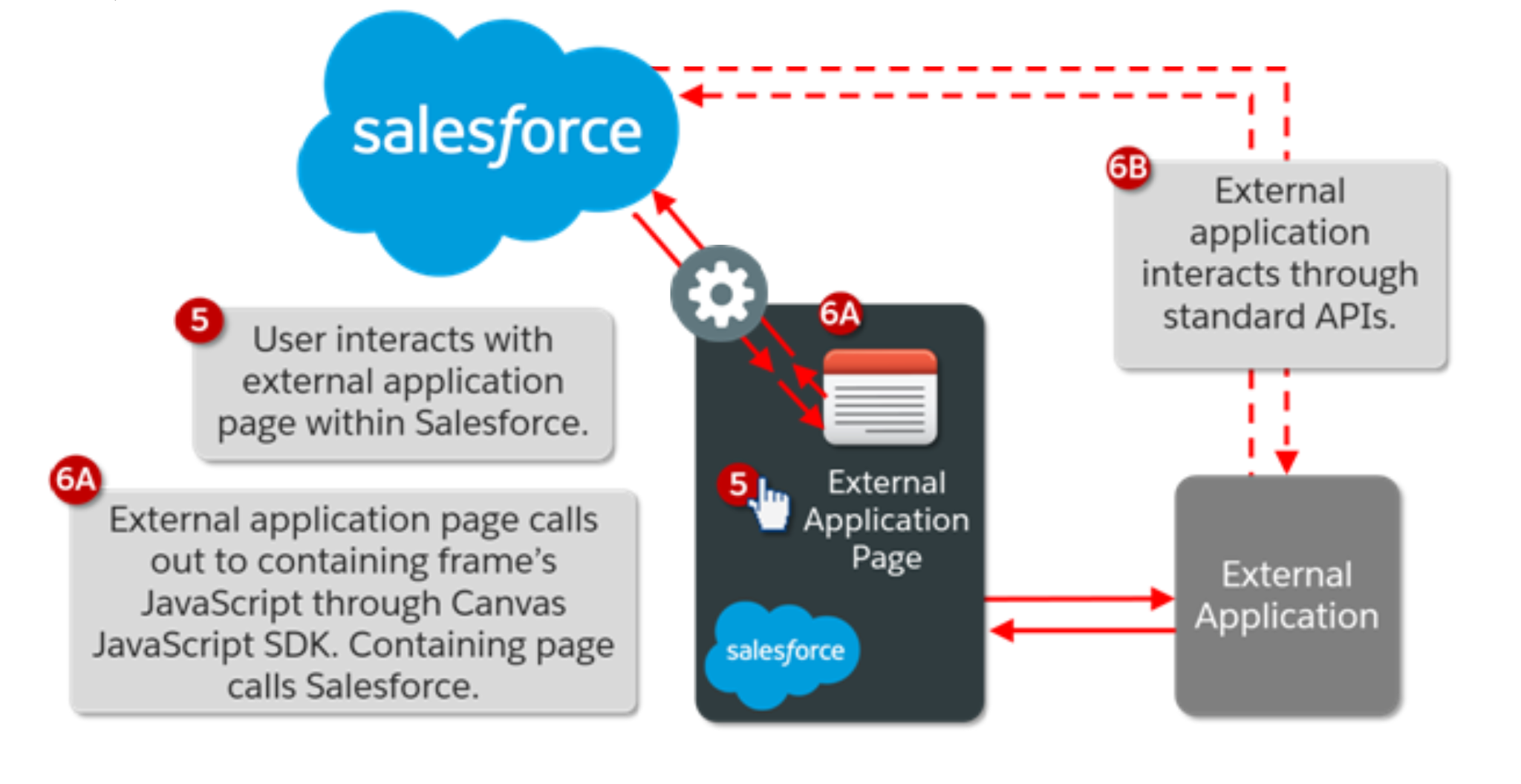
  • Due to the Same-origin policy, an external application page embedded within salesforce (Using Mashup) cannot communicate with the outer salesforce page because pages are of different origin.

How does Canvas work?

The same-origin policy is overcome through the use of Canvas JavaScript SDK. 


What are the securities aspect of Canvas?

  • Like any 3rd party application accessing salesforce, the canvas app must be registered as a connected app. Connected app framework controls external application to salesforce.
  • Canvas allows the use of HTTP POST or HTTP GE
    • The session Id and other query parameters are not exposed within the HTTP Post
  • Admin can also control accessing using:
    • OAuth Policy
    • Permission Set
    • Session level security
    • Usage report is available to monitor the access

Creating a canvas application within the salesforce-

  • Create the connected App with the Salesforce to get Consumer Key and Consumer Secret which will be used by 3rd party application
  • Configuring a canvas application  

How Salesforce will access the external application?

Within Salesforce, a canvas app is configured by one of two methods to specify how salesforce will connect the web application:

  1. Signed Request
    1. Default authentication method
    2. Uses HTTP Post
    3. While using the signed Request, the canvas app must be configured with “admin-approved users are pre-authorized”
  2. OAuth
    1. The external application handles OAuth either using its own methods or using method provided in SDK
    2. Salesforce perform HTTP GET when invoking Canvas app
    3. While using the OAuth, the canvas app must be configured with “admin-approved users are pre-authorized”  or “All user may self-authorize”

Which access method should you choose?

Signed Requests are the preferred access method as salesforce has built-in infrastructure and less chatter across the network. Use oAuth only when an external application already has OAuth Setup with salesforce or company is more comfortable with oAuth.

How to preview the canvas app?

The canvas app previewer allows you to:

  • Preview already created app
  • Create a Heroku Canvas app


What are the SDK classes and methods?

SDK provider below three canvas classes:

  1. Sfdc.canvas – general-purpose function
  2. Sfdc.canvas.client- function for client based activities
  3. Sfdc.canvas.oauth- functions supporting oauth
It includes the below method:

  1. Authentication -to authenticate applications
  2. Context- to retrieve context information about the environment in which the canvas application is running
  3. Cross-Domain XHR- to send cross-domain request back to salesforce
  4. Resizing -to resize the canvas application
  5. Events- to send and receive events between multiple applications
To know about other integration API at a glance, pls Click here

Wednesday, September 16, 2020

Inbound Vs Outbound Web Service in Salesforce

Salesforce may call the other system or external system can call to salesforce.

Inbound Web Service

Inbound web service is when Salesforce exposes SOAP/REST web service, and any external/third party application consumes it to get data from your Salesforce org. It is an Inbound call to Salesforce, but outbound call to the external system. Here, Salesforce is the publisher, and external system is the consumer of web services.

For Inbound integration, the Salesforce developer is responsible to provide the REST URL and Request format to 3rd party in case of REST API, and WSDL file in case of SOAP API and external application will consume the services.

Outbound Web Service

Outbound web service is when Salesforce consumes any external/third party application web service, a call needs to send to the external system. It is an Inbound call to the external system, but an outbound call to Salesforce. Here, the external system is the publisher of web services and Salesforce is the consumer.

For Outbound integration, Salesforce developer will get REST URL or WSDL file from external application and will hit the REST URL by HTTP request in case of REST API, generate the apex class from WSDL file for SOAP API


To know more about the security aspect of integration, pls Click here

To know about integration API at a glance, pls Click here

Integration Patterns

Integration Patterns

In the real world, no standalone application can fulfill customer need and one system is always rely on other system and hence Salesforce also needs to talk to another system for different purposes. Although each integration scenario is unique, but each must be solved with one kind of patters.

List of Patterns-The following are the patterns that cover all strategies to connect Salesforce with external applications:

  1. Request & Reply - Salesforce invokes the process to the remote system, waits for completion and reply, track state based on the response.
  2. Fire & Forget- Salesforce invokes a process to a remote system, receives acknowledgment (doesn't wait for completion), and hands-off control back to Salesforce
  3. Batch data Synchronization- Data stored in force.com should be created/refreshed to reflect updated by an external system, also changes in force.com data sent to the external system (bi-directional batch).
  4. Remote Call-in- Data stored in force.com is created, updated, or deleted by the external system.
  5. UI Update Based on Data Changes- Salesforce UI to automatically update based on salesforce data change.
  6. Data Virtualization-Salesforce accesses external data in real-time.
Pattern Approach-The integration patterns in this article are classified into three categories:
  • Data Integration—These patterns address the requirement to synchronize data that resides in two or more systems so that both systems always contain timely and meaningful data.
  • Process Integration—The patterns in this category address the need for a business process to leverage two or more applications to complete its task.
  • Virtual Integration—The patterns in this category address the need for a user to view, search, and modify data that are stored in an external system.
Request & Reply –


  • Salesforce calling remote system to perform an action waits for the reply synchronously and updates the response back in Salesforce
  • Example - Salesforce collection order info and sends to the Order processing system (SAP ECC) and waits for the Order status/number and updates in salesforce.
Forces- 
  • Is sync call necessary?
  • Do Salesforce need to process the response in same transaction
  • Message size (small/large)
  • Is UI based event or DML based data change event that triggers this invocation?
Solution:
  • Vf page to initiate APEX SOAP callout in sync manner (UI initiated action)
  • Salesforce consumes system WSDL and generate Apex proxy classes to call remote service. Vf page calls this proxy class to invoke remote service
  • Vf page to initiate APEX HTTP callout in sync manner (UI initiated action)
  • RESTful http services will be called by vf pages to invoke remote service
Additional Considerations:
  •  Salesforce has a configurable timeout up to 60 seconds for calls from Apex. Completed of apex process should be within this time or proper message should be handled.
  • This pattern is primarily for small volume real-time activities.
  • If Salesforce is the master, external system should store the Salesforce Id as external key. If Remote system is master, Salesforce should store the external id from the remote sytem
Limits:
  • Only 10 callouts per execution context
  • Max 60 seconds per callout. Max 120 seconds for all callouts
  • Max message size = 3MB (for request/response)
Fire & Forget


  • As the name suggests fire the call and forget. Salesforce invokes a process to the external system, receives acknowledgment but doesn't wait for completion and hands-off control back to Salesforce
  • Example - Salesforce collection order info and sends to Order processing system (SAP ECC) and lets it handle for Order completion. Also optionally Order status/number is updated in salesforce.
Forces:
  • Is sync call necessary?
  • Is the message size small?
  • Is the integration based on the occurrence of a specific event, such as a button click in the Salesforce user interface, or DML-based events?
  • Is guaranteed message delivery from Salesforce to the remote system a requirement?
  • Does the endpoint or the Enterprise Service Bus (ESB) support long polling?
  • Are declarative configuration methods preferred over custom Apex development? In this case, solutions such as platform events are preferred over Apex callouts.
Solution:
  • Platform events- Best
  • Outbound messaging
  • Calls to a remote system can be performed from a batch job.
  • Vf page with async callout Not the best fit. Also, it needs to handle guaranteed delivery by custom code.
Additional Considerations:
  • The remote system must handle subsequent errors when the initial invocation is handed off for asynchronous processing.
  • Workflow rules can't track deletion of a record, only inserts or update of a record. To send an outbound message for deletion - develop trigger to create new record in custom object for deleted ids. Implement workflow outbound on custom object send delete the message
Calling Mechanisms-
  • Process Builder(Used for platform event)
  • Lightning component or Visualforce and Apex controllers (Used to invoke a remote process asynchronously using an Apex callout.)
  • Workflow rules (Used only for the outbound messaging solution)
  • Apex triggers (Used for platform event)
Limits:
  • Waits for acknowledgment upto 10 seconds, after 10 seconds salesforce tries to resend message for up to 24 hours. The retry frequency increases exponentially starting at 15 sec interval and ending with 60min interval. Admin can retry manually (monitoring from the queue after 24hr period)
  •  Single outbound message can have upto 100 records
  • Only 10 call-outs per execution context
  • Max 60 seconds per callout . Max 120 seconds for all callouts
  • Max message size  = 3MB (for request/response)
Batch data Synchronization


  • Extract and transform object data from/to Salesforce with from/to external system for one time or ongoing basis.
  • Example - ETL billing data into salesforce from remote system on a weekly basis
Forces:
  • Aync Data Integration = Batch
  • Should Data stored in salesforce?
  • Should data be refreshed in salesforce if remote system changes data (on a scheduled basis?)
  • Data support primary biz process/analytics requirements?
Solution:
  • 3rd party ETL that uses Bulk API / SOAP API from remote to salesforce for change data capture
  • 3rd party ETL that uses Bulk API / SOAP API from Salesforce to remote change data capture
Additional Considerations:
  • If multiple database is consolidated to Salesforce, maintain Control tables in an intermediate on-premise database
  • Maintain LastRunTime in control table and other needed values from Control table and use it for next execution
  •  If processing is successful, update the control values in control table
  • If processing failed, update the control vlaues that enable a restart and exit
  • If importing child records of Master-detail relationship, group the imported data using its parent key at the source to avoid locking. Ex - If importing contact data for account, group all contacts per account, so you can load in bulk.
  • Timeliness - Running batch during normal biz operation might lead to data contention either on user side or batch fail if same record is accessed. Use Data segmentation by record type to minimize the effect or run the batch on non-biz hours if possible

Remote Call-in

  • As name suggestion remote application makes the call to salesforce. Invoking Salesforce for updating/querying the Salesforce from remote system
  • Example - Order processing system (SAP ECC) update order status in salesforce after processing the order
Forces:

  • Is sync call necessary? 
  • Do Salesforce need to process the response in same transaction?
  • Message size (small/large)?
  •  Is transaction processing required?
  • If the remote system is SOAP-capable, is the remote system able to participate in a contract-first approach, where Salesforce dictates the contract? This is required where our SOAP API is used, for which a predefined WSDL is supplied.
Solution:
  • SOAP API - Generate WSDL (using Partner/Enterprise),  Synchronous API, Query and DML operations, Bulk processing (for 500K or more records use Bulk API)
  •  REST API -  Synchronous HTTP api for query and dml ops,
  • Apex web services
  • Apex REST services
  • Bulk API

 Limits:

  • Session timeout -
  • Query timeout - each query has a individual timeout of 120 seconds.
    • runs 200 records / request.
    • Default batch size = 500 records (max 2000 records). Use queryMore() for fetching additional records if max reached
  • Bulk API
    • Max 10k records per batch
    • Max 5000 batches / 24 hr period

UI Update Based on Data Change

  • Real-time update of CRM data changes in Salesforce UI
  • Ex - Call center agent wants to see the payment processing record while on a call with customer when customer pays it to the payment center
Forces
  • Does the data being acted on need to be stored in Salesforce?
  • Can a custom user interface layer be built for viewing this data?

Solution

  • Salesforce Streaming API to update Salesforce UI
  • PushTopic with query defn for what data is needed with filter conditions
  • Javascript based implementation of Bayeux protocol
  • Visualforce page
  • JS library in static resource
Additional Considerations

  • Delivery and order of notification is not guaranteed
  • No notifications for changes made from Bulk 
Data Virtualization

  • In Salesforce, how do you view, search, and modify data that’s stored outside of Salesforce, without moving the data from the external system into Salesforce?
  • Orders are managed by an external (remote) system. But sales reps want to view and update real-time order information in Salesforce without having to learn or use the external system.

Forces

  • Do you want to build a declarative/point-and-click outbound integration or UI mashup in Salesforce?
  • Do you have a large amount of data that you don’t want to copy into your Salesforce org?
  • Do you need to access small amounts of remote system data at any one time?
  • Do you need real-time access to the latest data?
  • Do you store your data in the cloud or in a back-office system, but want to display or process that data in your Salesforce org?
  • Do you have data residency concerns for storing certain types of data in Salesforce?

Solution-

  • Salesforce Connect

To know more about the security aspect of integration, pls Click here

To know about integration API at a glance, pls Click here  

Wednesday, January 13, 2016

Salsforce API

API stands for Application Programming Interface. With the help of API, we can connect two or more applications altogether. 

To understand the concept of API, let's consider the example of a restaurant. If you go there, you will get a Menu list, and there will be a separate kitchen. You just select the item from the menu list and the waiter will take the order and send it to the chef in the kitchen and once the order is ready, he will deliver to you.  You know need to worry about how the order will come. You just order and you get it from the waiter. Here waiter is working as an API.

There are the following APIs in the Salesforce:

REST API

  • Force.com REST API lets you integrate with the force.com applications using simple HTTP methods.
  • The request/response would be in the form of xml or JSON.
  • Useful in light weighted application like mobile application
  • Click for more detail

SOAP API

  • SOAP API works on SOAP (WSDL) protocol. 
  • The request/response would be in the form of xml.
  • We can use SOAP API to integrate Salesforce with your organization’s ERP and finance systems.
  • Click for more detail

Tooling API

  • As the name itself suggests, use tooling API to build custom development tools for Force.com applications.
  • You can get the code coverage information with the help of Tooling API.

Streaming API

  • Use Streaming API to receive notifications for changes to data that match a SOQL query that you define.
  • Streaming API is useful when you want notifications to be pushed from the server to the client.
  • Streaming API enables you to reduce the number of API calls and improve performance.
  • Click for more detail

Chatter REST API

  • Access Chatter feeds and social data such as users, groups, followers, and files using REST.
  • Click for more detail

Bulk API

  • Bulk API is based on REST principles and is optimized for loading or deleting large sets of data.
  • You can use it to query, insert, update, upsert, or delete many records asynchronously by submitting batches. Salesforce processes batches in the background.
  • SOAP API, in contrast, is optimized for real-time client applications that update a few records at a time. SOAP API can be used for processing many records, but when the data sets contain hundreds of thousands of records, SOAP API is less practical. Bulk API is designed to make it simple to process data from a few thousand to millions of records.
  • The easiest way to use Bulk API is to enable it for processing records in Data Loader using CSV files. Using Data Loader avoids the need to write your own client application.
  • Click for more details

Metadata API

  • Use Metadata API to retrieve, deploy, create, update, or delete customization for your organization. 
  • The most common use is to migrate changes from a sandbox or testing organization to your production environment. 
  • Metadata API is intended for managing customization and for building tools that can manage the metadata model, not the data itself. Like The Force.com Migration Tool, Force.com IDE
  • Click for more detail

Apex REST API

Apex SOAP API
  • Use Apex SOAP API when you want to expose Apex methods as SOAP Web service APIs so that external applications can access your code through SOAP.
  • Click for more detail
To know more about the security aspect of integration, pls Click here

Saturday, May 18, 2013

WebService Fuctions

Apex Web Service

Apex class methods can be exposed as custom Force.com Web services API calls. This allows an external application to invoke an Apex web service to perform an action in Salesforce.com. Use the Webservice keyword to define these methods. For
Example:
global class MyWebService {
webService static Id makeContact(String lastName, Account a) {
Contact c = new Contact(lastName = 'Weissman', AccountId = a.Id);
insert c;
return c.id;
}
}
A developer of an external application can integrate with an Apex class containing webService methods by generating a WSDL for the class.To generate a WSDL from an Apex class detail page:
1. In the application navigate to Your Name ➤ Setup ➤ Develop ➤ Apex Classes.
2. Click the name of a class that contains web Service methods.
3. Click Generate WSDL.

Considerations for Using the WebService Keyword:

  • You cannot use the webService keyword when defining a class. However, you can use it to define top-level, outer class methods, and methods of an inner class.
  • You cannot use the webService keyword to define an interface, or to define an interface's methods and variables.
  • System-defined enums cannot be used in Web service methods.
  • You cannot use the webService keyword in a trigger because you cannot define a method in a trigger.
  • All classes that contain methods defined with the webService keyword must be declared as global. If a method or inner class is declared as global, the outer, top-level class must also be defined as global.
  • Methods defined with the webService keyword are inherently global. These methods can be used by any Apex script that has access to the class. You can consider the webService keyword as a type of access modifier that enables more access than global.
  • You must define any method that uses the webService keyword as static.
  • You cannot deprecate web Service methods or variables in managed package code.
  • Because there are no SOAP analogs for certain Apex elements, methods defined with the webService keyword cannot take the following elements as  parameters.While these elements can be used within the method, they also cannot be marked as return values.
    • Maps
    • Sets
    • Pattern objects
    • Matcher objects
    • Exception objects
  • You must use the webService keyword with any member variables that you want to expose as part of a Web service. You should not mark these member variables as static.
  • Salesforce.com denies access to Web service and execute anonymous requests from an AppExchange package that has restricted access.
  • Apex classes and triggers saved (compiled) using API version 15.0 and higher produce a runtime error if you assign a String value that is too long for the field.
To know about other integration API at a glance, pls Click here
To know more about the security aspect of integration, pls Click here